By Group "Text Trader"
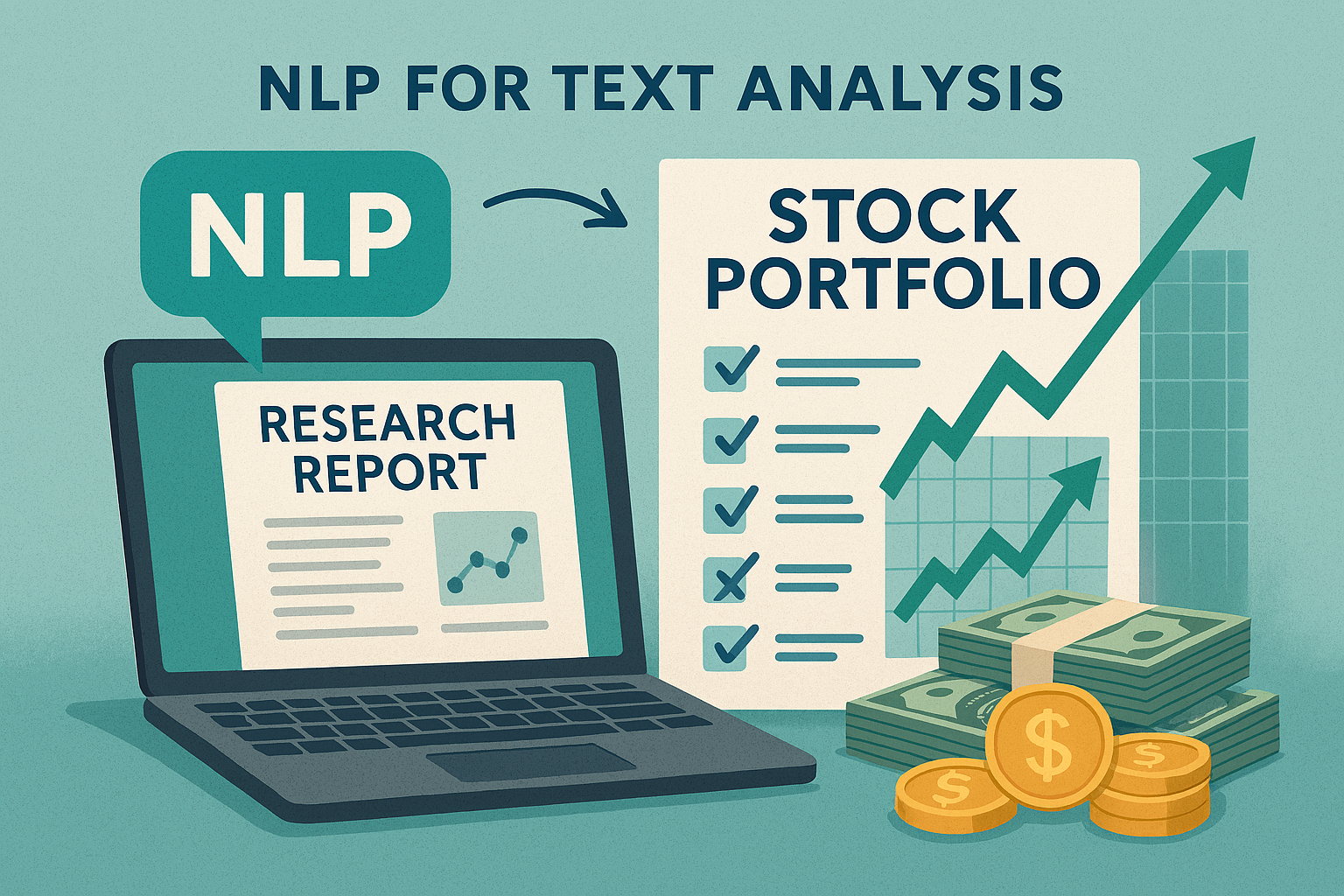
From the very beginning, our project set out to analyze research reports written by institutional experts in the stock market. The idea was simple but ambitious: could we measure whether professional analysts’ opinions were able to predict stock market and guide our investment?
Almost immediately, we hit a wall. English-language research reports were nearly impossible to obtain for free. Most were locked behind paywalls, sold to institutional buyers, or protected as business secrets. That forced us to pivot. Instead of chasing scarce English reports, we turned our attention to the Chinese market, where research reports are widely published and freely accessible. With approval from Prof. Buehlmaier, we committed to translating Chinese reports into English to meet the project requirements.
Data Collection from Eastmoney
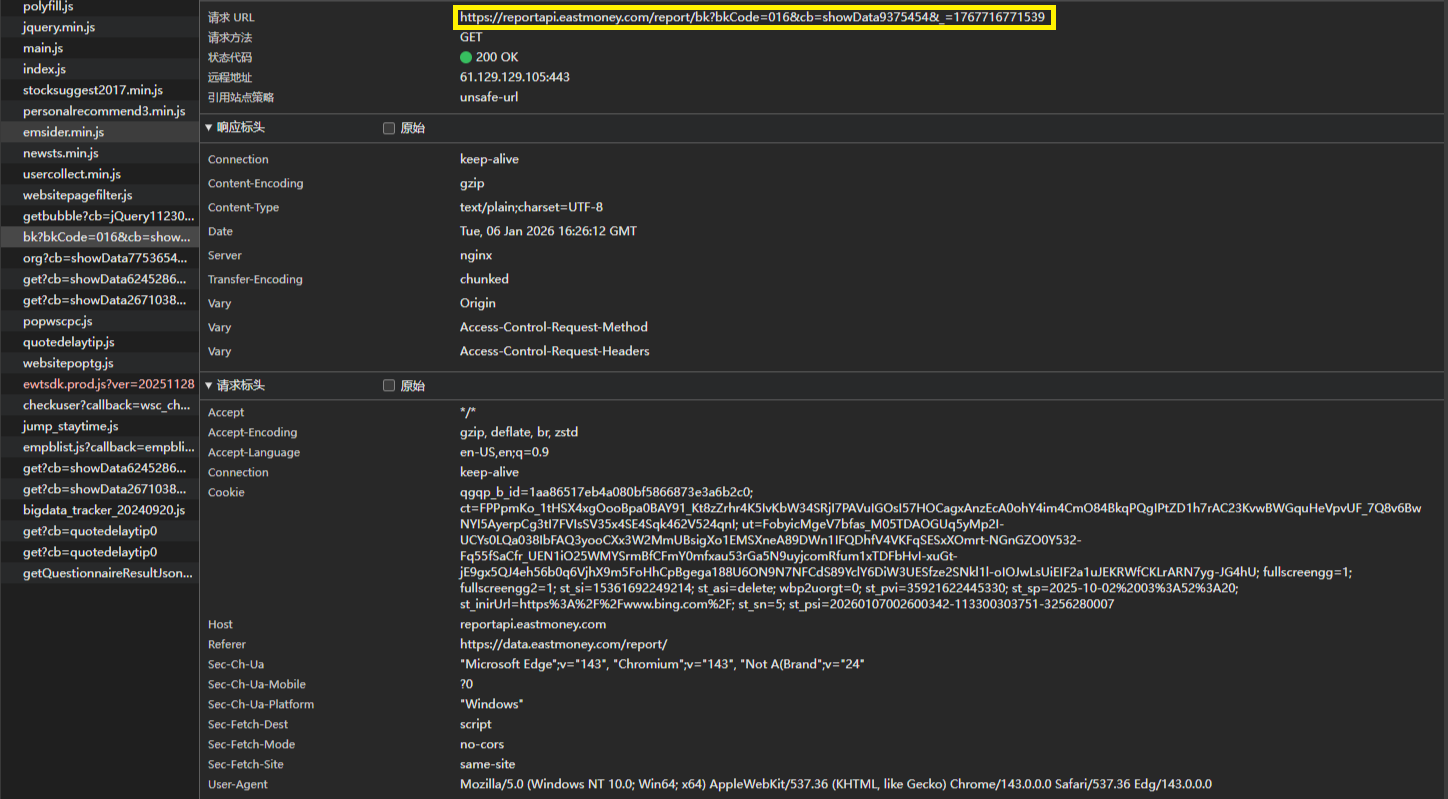
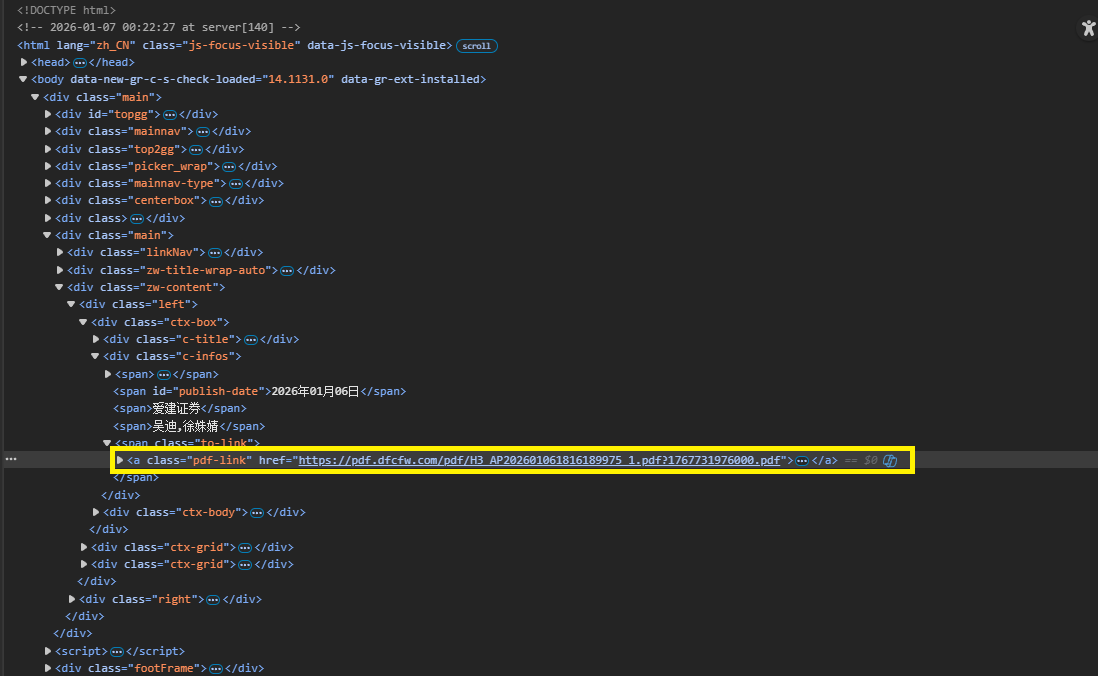
Our first step was data collection. By examining the Eastmoney report center’s website structure, we identified a publicly accessible API endpoint that allowed us to navigate the site and access original PDF download links. This gave us a way to systematically collect reports at scale.
- API endpoint and PDF download link identified via the website’s network requests:
We then built an automated downloader, targeting all CSI300 index stocks from 2017 to 2025. The dataset was massive, and downloading it took two full days. To be respectful of the website’s server capacity, we implemented responsible rate-limiting measures:
- Request identification: setting appropriate browser headers for our requests.
- Request throttling: adding delays between downloads to avoid triggering anti-scraping protections.
USER_AGENTS = [
    "Mozilla/5.0 (Windows NT 10.0; Win64; x64)...",
    "Mozilla/5.0 (Macintosh; Intel Mac OS X 10_15_7)...",
    "Mozilla/5.0 (Windows NT 10.0; Win64; x64; rv:89.0)..."
]

def get_random_user_agent():
    import random
    return random.choice(USER_AGENTS)

headers = {
    "User-Agent": get_random_user_agent(),
    "Referer": "https://data.eastmoney.com/"
}

for code, name in stock_list:
    print(f"Start downloading {code} {name} reports")
    set_stock_code(code)
    process_all_reports()
    print(f"Finished {code} {name}")
    time.sleep(1)  # delay between stocks
This approach worked well, and once the dataset was downloaded, we immediately made backup copies — a precaution that later proved invaluable.
Testing the Idea with a Minimum Viable Product
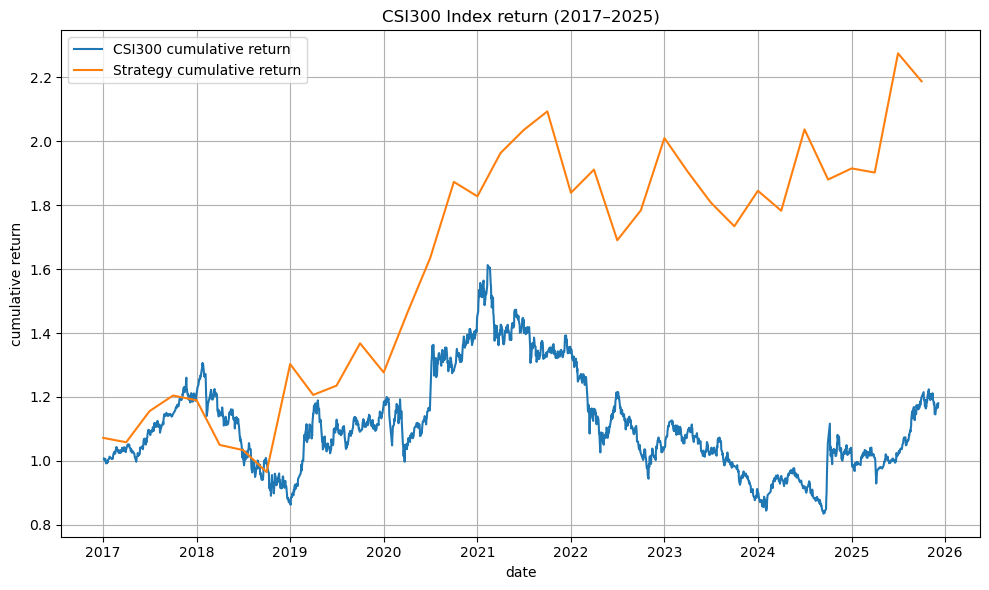
Before diving into complex NLP, we wanted to test whether the project idea was viable. We built a minimum viable product (MVP) that skipped preprocessing and sentiment analysis. Instead, we simply matched keywords in each report’s conclusion: buy, hold, or sell. Using these signals, we constructed a weighted portfolio and rebalanced quarterly.
The results were surprisingly strong. The MVP portfolio significantly outperformed the CSI300 benchmark, giving us confidence that the project was worth pursuing.
Facing the PDF Extraction Challenge
With feasibility confirmed, we moved on to preprocessing. The workflow we envisioned was:
PDF → Chinese text → Cleaned Chinese text → English translation → Cleaned English text → Tokenization → Text analysis
It looked straightforward on paper, but reality was much messier. Extracting text from PDFs using packages like PyPDF2 or Apache Tika quickly became a nightmare. Financial reports are full of tables, charts, headers, footers, and non-UTF-8 characters.
-
PyPDF2 often jumbled text with table content, splitting sentences into meaningless fragments.
-
Tika struggled with non-standard encodings, producing unreadable garbage.
-
Translation models choked on these malformed inputs, yielding nonsensical English outputs.
Naive approach we used at the beginning:
from PyPDF2 import PdfReader

reader = PdfReader("example.pdf")
text = ""

for page in reader.pages:
    text += page.extract_text() + "\n"

with open("output.txt", "w", encoding="utf-8") as f:
    f.write(text)
This naive approach highlighted the problem: traditional PDF-to-text tools couldn’t handle the complexity of financial reports.
Rebuilding the Pipeline with OCR and Layout Analysis
The Logic We Followed
- 1.Render PDF pages into images
Convert each page into a PIL image at 150 DPI.
def pdf_to_images_fast(pdf_path, dpi=150):
    import fitz
    from PIL import Image

    doc = fitz.open(pdf_path)
    images = []
    for page in doc:
        try:
            pix = page.get_pixmap(dpi=dpi, annots=False)
            img = Image.frombytes("RGB", (pix.width, pix.height), pix.samples)
            images.append(img)
        except Exception as e:
            print(f"[Warning] Rendering failed: {e}")
            continue
    return images
- 2.Run OCR and layout detection
OCR produced text lines with bounding boxes, while layout models classified regions (Text, Table, SectionHeader, etc.).
foundation = FoundationPredictor()
detector = DetectionPredictor()
recognizer = RecognitionPredictor(foundation)
layout_predictor = LayoutPredictor(
    FoundationPredictor(checkpoint=settings.LAYOUT_MODEL_CHECKPOINT)
)

    images = pdf_to_images_fast(pdf_path, dpi=150)
    if not images:
        return ""

    # Full-page OCR
    ocrs = recognizer(images, det_predictor=detector)

    # Full-page layout detection
    layouts = layout_predictor(images)
- 3.Filter by region labels
Keep only text-like regions (e.g., body text, headers, list items) and drop tables, charts, and metadata.
def is_in_text_region(line, layout_page):
    for region in layout_page.bboxes:
        if region.label in ["Text", "SectionHeader", "ListItem"]:
            if line_in_bbox(line.bbox, region.bbox):
                return True
    return False
-
4.Apply cleaning rules
-
Basic cleaning: remove page numbers, headers, footers.
-
Strict cleaning: drop footnotes, contact info, disclaimers, fragments, and HTML tags.
def clean_line_basic(line: str):
    line = line.strip()
    if not line: return None
    if is_page_number(line): return None
    if is_toc_line(line): return None
    if is_header_footer(line): return None
    return line
- 5.Aggregate and batch process Surviving lines were joined into coherent text, and the pipeline was applied across the entire dataset. Instead of forcing PDFs into text extraction libraries, we reimagined the process. We decided to treat reports as images and apply computer vision techniques. By rendering each page into an image and running OCR combined with layout detection, we could selectively extract only the meaningful text regions.
Cleaning Out Noise and Disclaimers
Even after all the OCR and layout filtering, some unwanted text inevitably slipped through — disclaimers, researcher introductions, and institutional boilerplate. After examining the structure of reports, we noticed a consistent pattern: these sections almost always appeared at the end, with no useful content following them.
That insight allowed us to apply a simple rule: stop processing once a disclaimer keyword appeared. This removed large chunks of noise efficiently.
stop_keywords = disclaimer_keywords + rating_keywords

for line in lines:
    line = line.strip()
    if not line:
        continue
    # If any stop keyword appears, stop processing further lines
    if any(k in line for k in stop_keywords):
        break
    cleaned_lines.append(line)

cleaned_text = "\n".join(cleaned_lines)
cleaned_text = re.sub(r"\n{2,}", "\n", cleaned_text)  # collapse blank lines
This step removed large chunks of useless noise at the end of reports. But there was still a problem: some unwanted fragments appeared unpredictably throughout the text, without a clear structural pattern. Keyword rules alone couldn’t catch them.
Using Embeddings to Detect Noise
Faced with this challenge, we came up with a more nuanced idea: use sentence-level embeddings to distinguish between meaningful text and noise. The motivation was simple — while disclaimers and introductions don’t follow consistent positions, they do have consistent semantic characteristics. By comparing each line against prototype embeddings of “real text” versus “noise,” we could classify sentences more intelligently.
The pipeline we designed followed this logic:
Raw Chinese reports → LLM filtering (text vs noise) → Labeled text files → Label processing → Cleaned text corpus
Stage 1: LLM Filtering with Embeddings + Heuristics
We used the BGE-m3 embedding model collect two pools of examples for prototype building and calculate similarity score:
-
Positive examples: representative body text from reports.
-
Negative examples: disclaimers, metadata, table headers, and other noise.
class EmbeddingClassifier:
    def __init__(self):
        print("Loading BGE-m3 embedding model...")
        self.model = SentenceTransformer("BAAI/bge-m3")

        self.pos_examples = ["text example 1", "text example 2"]
        self.neg_examples = ["noise example 1", "noise example 2"]

        self.pos_emb = self.model.encode(self.pos_examples, convert_to_tensor=True)
        self.neg_emb = self.model.encode(self.neg_examples, convert_to_tensor=True)

    def classify(self, line: str) -> str:
        text = line.strip()
        if not text:
            return "noise"

        emb = self.model.encode(text, convert_to_tensor=True)
        pos_sim = util.cos_sim(emb, self.pos_emb).max().item()
        neg_sim = util.cos_sim(emb, self.neg_emb).max().item()

        if neg_sim > 0.65 and neg_sim > pos_sim:
            return "noise"
        else:
            return "text"
Context-Aware Recheck One issue we encountered was that short fragments (like numbers or symbols) were often misclassified as noise, even when they were part of meaningful sentences. To reduce false positives, we added a recheck step: short lines were re-evaluated in the context of their neighboring lines. If the combined text looked like valid content, we reclassified it as “text.”
candidates = [
    line,
    prev1 + " " + line,
]

for text in candidates:
    if clf.classify(text) == "text":
        return "text"
return "noise"
This context-aware recheck significantly improved accuracy, ensuring that fragments weren’t discarded prematurely.
Stage 2: Label Postprocessing and Noise Filtering
Once each line was labeled, we applied two straightforward rules:
-
1.If a .txt file contained too many noisy lines, discard the entire file.
-
2.Otherwise, remove lines tagged as “noise” and keep the “text” lines, stripping away the label prefixes.
def process_label(input_file, output_file):
    with open(input_file, 'r', encoding='utf-8') as f:
        lines = f.readlines()

    cleaned_lines = []
    noise_counter = 0

    for line in lines:
        line = line.strip()
        if not line:
            noise_counter += 1
            continue

        tokens = line.lower().split()

        # Skip line if labeled as noise
        if tokens and tokens[0] == "noise":
            noise_counter += 1
            continue

        # Remove label prefix
        cleaned_line = "".join(tokens[1:]) if len(tokens) > 1 else ""
        if cleaned_line:
            cleaned_lines.append(cleaned_line)

    if len(lines) > 0 and noise_counter / len(lines) < 0.5:
        with open(output_file, 'w', encoding='utf-8') as f:
            f.write('\n'.join(cleaned_lines))
        print(f"Processed: {input_file} → {output_file}.")
    else:
        print(f"Skipped {input_file} due to excessive noise.")
This stage gave us a much cleaner corpus, with noisy files discarded and useful text preserved.
Translation Step
With high-quality Chinese text in hand, we finally moved to translation. The process had two key steps:
-
1.Merge lines into paragraphs to improve fluency and prevent crashes.
-
2.Batch translation with error handling, ensuring residual Chinese characters were removed and fallback logic preserved outputs even if translation failed.
# Merge lines → paragraphs
paragraphs = []
buffer = []

for line in lines:
    if line.strip():
        buffer.append(line.strip())
    if len(buffer) >= merge_lines:
        paragraphs.append(" ".join(buffer))
        buffer = []

if buffer:
    paragraphs.append(" ".join(buffer))

paragraphs = [pre_clean(p) for p in paragraphs]

# Translate non-empty texts
try:
    results = translator(
        to_translate,
        batch_size=batch_size,
        truncation=True,
        max_length=max_length
    )
    translated = [
        remove_chinese(r["translation_text"]) if r and "translation_text" in r else ""
        for r in results
    ]
except Exception as e:
    print(f"Batch translation failed: {e}")
    translated = to_translate  # fallback
At this point, we had clean, high-quality English text — a milestone that marked the transition from preprocessing to analysis.
Lessons from Accidents
Beyond the technical challenges, we also faced accidents. One particularly painful incident came from a Git mishap. Early in the project, our repository was messy, so I decided to clean up the structure. In the process, I renamed the raw data folder that had been excluded via .gitignore. That change caused the dataset to be accidentally committed.
When I tried to push, Git froze. Attempts to fix it — rolling back versions, using git rm -r --cached, and resolving conflicts — eventually led to the catastrophic deletion of the entire dataset. Unlike files sent to the recycle bin, this kind of removal was unrecoverable.
The only thing that saved us was the offline backup copy we had made earlier. That accident taught me a hard but valuable lesson: always keep a backup of your work.
At the end, to whom reading this:
Thanks for reading and wish you never lose your work to accidents, and wish your own NLP journey be full of breakthroughs rather than breakdowns.